paid advertising · linkedin ads · b2b · saas
Is LinkedIn Ads Worth It for B2B? An Honest Review
When LinkedIn ads are worth the higher cost per lead for a B2B or SaaS company, how to measure the return, and when to leave them alone.
Published

Key takeaways
- LinkedIn ads are worth it for B2B and SaaS when one customer is valuable enough to carry a cost per lead that, in the accounts we run, almost always sits above Google’s.
- Judge it on lifetime value, not cost per click. An expensive lead that becomes a contract renewing for years is a cheap lead.
- Never run it on its own. LinkedIn creates the demand that Google later converts, so in most B2B accounts about three pounds in every four go to Google and one in four to LinkedIn.
- Measure it on qualified demos and paying customers sent back from your CRM, not on the platform’s own conversion column.
- Leave it alone if you are pre-product-market fit, sell on a small contract value, or cannot fund it for long enough to learn anything.
Yes, for most founder-led B2B and SaaS companies with a valuable customer, LinkedIn ads are worth it. Just rarely for the reason people buy them. LinkedIn lets you choose an audience by job title and employer, built from what people put on their own profiles, and you pay handsomely for that precision. Judged alone, on the leads it books inside a month, it usually looks expensive. Run beside Google Search, with pipeline tracked back from your CRM, it is often the quiet reason Google’s numbers get better.
That is the honest version. Here is how we decide, account by account, whether it earns its place.
When LinkedIn ads are worth it, and when they are not
LinkedIn ads are worth it when three things are true: one customer is worth enough over their lifetime to absorb a dear lead, your buyer can be described by job title and company, and something else (Google Search, a sales team, outbound) is ready to turn that attention into a deal. Miss one and LinkedIn struggles. Miss two and it burns money politely.
The first condition does most of the work. Founders tend to look at a LinkedIn cost per lead, compare it with what Google charges, and wince. The better question is what a customer is worth across the years they stay. If you sell an annual contract that renews, a lead costing several times a Google lead can still be the cheapest customer you ever bought, provided enough of them close. If you have not worked that figure out, calculate your customer lifetime value before you spend a pound on LinkedIn.
It tends not to be worth it when:
- You are pre-product-market fit, or churn is high. Ads are the most expensive way to find out whether people want the thing.
- Contract value is small. If one customer is worth a few hundred pounds, the arithmetic of a LinkedIn lead rarely closes.
- The audience is tiny. A few hundred people in the world who could buy is an account list for your sales team, not an ad audience.
- The budget is thin. We set a minimum ad spend per platform for exactly this reason: below it, LinkedIn never gathers enough data to tell you anything useful.

Why LinkedIn leads cost more than Google leads
LinkedIn leads cost more because you are paying for who someone is, not for what they are doing. A Google searcher has just told you they want something. A LinkedIn member has only told you their job. In the accounts we run, LinkedIn’s cost per lead sits above Google’s almost every time, and we plan budgets around that rather than pretending it away.
What the premium buys is reach into people who are not searching yet. LinkedIn’s targeting options page (read on the 18th of November 2026) says Job Title targeting is built mainly from what members enter on their own profiles, with no third-party data, and that companies can be picked by name and by industry. That is how a finance director at a 40-person software firm becomes reachable at all. Google cannot show her an ad until she types something, and by then your competitors may be bidding on the same words.
So the comparison founders make, LinkedIn’s cost per lead against Google’s, is the wrong one. Expensive clicks are not the enemy. In our own research into cheap clicks across eight B2B accounts, the dearer non-brand Google keywords came out with the lower cost per acquisition. The same logic applies here: what matters is the cost of a customer, not of a click. For the mechanics of what LinkedIn charges and how much to start with, see how much LinkedIn ads will cost your business and what your LinkedIn budget should be.
LinkedIn creates the demand Google converts
LinkedIn is at its best putting your name in front of buyers before they start looking, and Google is at its best catching them when they do. That is why we never run LinkedIn standalone. In most B2B and SaaS accounts we run, about three pounds in every four go to Google and one in four to LinkedIn.
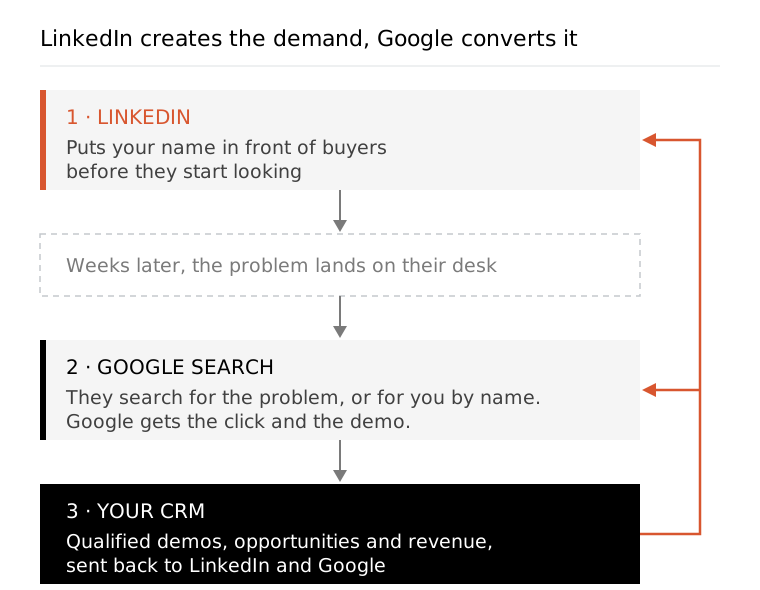
The pattern goes like this. A head of operations sees your ad a few times in her feed over a month and does nothing, because nobody buys software from a feed. Weeks later, the problem you described lands on her desk, and she searches for it on Google, or searches for you by name. Google gets the click and the demo. LinkedIn gets nothing in its own reporting, and if you only read Campaign Manager, you switch it off.
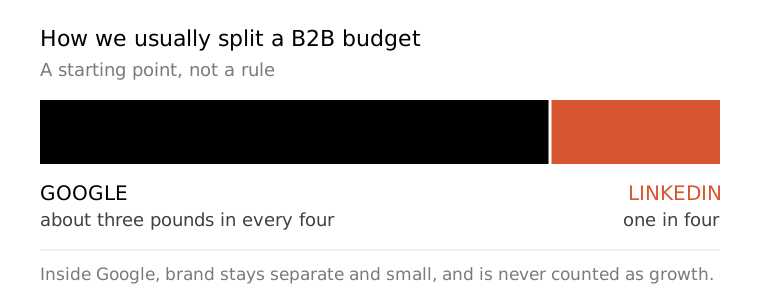
The split is a starting point, not a rule. A company selling into a narrow, senior audience that rarely searches may lean harder on LinkedIn; one with plenty of search demand may need less of it. What does not change is the order: Google Search first, because it catches intent that already exists, then LinkedIn to create more of it. Inside Google, brand campaigns stay separate and small, and brand conversions are never counted as growth, LinkedIn’s or anyone else’s. Our Google Ads guide for SaaS covers the Google side of that structure.

How to measure LinkedIn ads ROI
Measure LinkedIn on what your CRM says happened, not on what Campaign Manager says happened. Count the qualified demos, opportunities and paying customers that started on LinkedIn, put a value on each, and set that against spend plus fees over a window as long as your sales cycle. Anything shorter measures the weather.
LinkedIn makes this possible. Its conversion tracking guide (read on the 18th of November 2026) lists four data sources: the Conversions API, the website tags (LinkedIn’s Insight Tag and Microsoft’s UET tag), a CRM partner connected through CRM Sync, and a CSV upload. The Insight Tag is the familiar one, and our guide to LinkedIn ads tracking covers setting it up. The server and CRM routes matter more for B2B, because the conversion you care about happens weeks later on a sales call, not on your website.
Here is what we put in front of a founder each month:
- Qualified demos, not form fills. Students, job seekers and free-tool hunters inflate the raw count, so we judge on lead quality.
- Opportunities and closed revenue sent back from the CRM to LinkedIn and Google, so both optimise toward the people who buy rather than the people who click.
- Google demo volume in the same weeks, read beside LinkedIn as context rather than credited to it.
- Cost per qualified demo and per customer, including our fee, set against lifetime value.

What a sensible first three months look like
Set tracking up before a pound is spent, start with one tightly described buyer, and change one thing at a time. The build is a fraction of the job. Most of the money in a LinkedIn account is made in the weekly checks afterwards, which is what a client is actually paying for. If you are starting from nothing, our guide on how to use LinkedIn ads for B2B covers the build itself.
Month one: finding the fit
The first stage is testing a wide range of variants across targeting, messaging and creative, to find which roads lead anywhere. Every creative brief names the exact person, their problem and the one action we want them to take. “Marketing leaders at mid-market companies” is not a person. “The founder of a 30-person SaaS company who still runs marketing on Sunday evenings” is. Lead Gen Forms against a landing page is one of the first tests, and our guide to LinkedIn Lead Gen Forms covers how each behaves.
Months two and three: scaling the spend
Once something works, protect it. Put about four-fifths of spend behind the winners and a fifth into new tests, and never more than double the account’s spend inside a single month, however good one week looked. A LinkedIn rep may suggest widening the audience or handing it to the algorithm. Advice from a platform is written for the platform’s revenue, so we audit it rather than follow it. If results stall, why your LinkedIn ads aren’t working is the place to start.
Worth it as the second platform, not the first
For a founder-led SaaS or B2B company with a valuable customer and Google Search already running, LinkedIn ads are usually worth it. Expect a higher cost per lead, judge it on lifetime value and pipeline, give it a full sales cycle to prove itself, and never ask it to do Google’s job. For a company still finding product-market fit, or selling something cheap, the honest answer is not yet.
If you’d like to know which of those you are, ask us for a free account audit. We look at Google and LinkedIn together, because that is the only way to see what either is really doing. Our LinkedIn advertising agency and SaaS paid ads agency pages explain how we run accounts and what we charge.
FAQ
Questions people ask
Will LinkedIn spend more than my daily budget?
On some days, yes. LinkedIn's budget help page, read on the 18th of November 2026, describes the daily budget as an average: on a continuous schedule one day can run up to 100% over it, but a Monday to Sunday week will not go past seven times the daily figure. Plan around the weekly and monthly number, not the daily one.
Do LinkedIn Lead Gen Forms cost extra?
No. LinkedIn's help centre says there is no additional cost for Lead Gen Forms beyond the ad sets they run in. The form fills in the member's contact and profile details for them, takes up to 12 informational fields, and can end with a booking link. Easy forms bring volume, so check the quality in your CRM before celebrating the count.
What is the smallest budget LinkedIn will let me run?
LinkedIn's own budget guide, read on the 18th of November 2026, sets the minimum daily budget at $10 for any ad format and the minimum lifetime budget for a new campaign at $100, both quoted in US dollars. That is enough to switch a campaign on, not enough to learn anything from it.
Can LinkedIn target companies by revenue or size?
Yes. LinkedIn's targeting help page lists Company Revenue, which targets companies by estimated annual revenue, and Company Size, which mostly uses the size a Page admin entered, or the number of members linked to the Page when none was given. Both are estimates, so test them against a list of the accounts you actually want to win.
Should I let LinkedIn's Auto-Targeting build my audience?
Not to start with. LinkedIn describes Auto-Targeting as combining its professional audience, platform signals and your inputs to build the audience for you. That saves time, but in a new account it hides who you are really reaching. We build the audience by hand first, learn which job titles turn into demos, then test automation against that.