guides · paid advertising · ppc · saas
How to Know If Your Paid Ads Are Working
Not sure whether your paid ads are performing? Here's a detailed guide on how to know if your paid ads are working.
Published · Updated

Most businesses have no idea if their ads are working. That's not a dig, it's just the reality. You're spending money every month, your agency or platform sends you a report full of numbers, and you nod along while quietly wondering if any of it is actually doing something. This article will help you cut through the noise, understand which metrics actually matter, and figure out whether your campaigns are earning their keep.
We'll cover the difference between numbers that look impressive and the ones that actually tell you something, how to check if your tracking is even set up correctly, and what "working" should look like at different stages of a campaign. By the end, you'll have a much clearer picture, even if that picture turns out to be a bit uncomfortable.
The Metrics Most People Look At (and Why They're Misleading)
When most business owners open their ads dashboard for the first time, they get drawn to the big flashy numbers. Impressions in the millions. Thousands of clicks. A click-through rate that looks healthy enough. It feels like progress. The problem is, none of these tell you whether you're making money.
Impressions just mean your ad appeared on someone's screen. Clicks mean they visited your site. CTR (click-through rate) measures the ratio between the two. These are useful for diagnosing creative or targeting issues, but they are not performance metrics on their own. A campaign with a 5% CTR and zero conversions is still a failure. Don't let the platform convince you otherwise. Ad platforms are incentivised to show you numbers that look good, because that's what keeps you spending.
The Metrics That Actually Tell You Something
Here's where you should actually be focusing your attention:
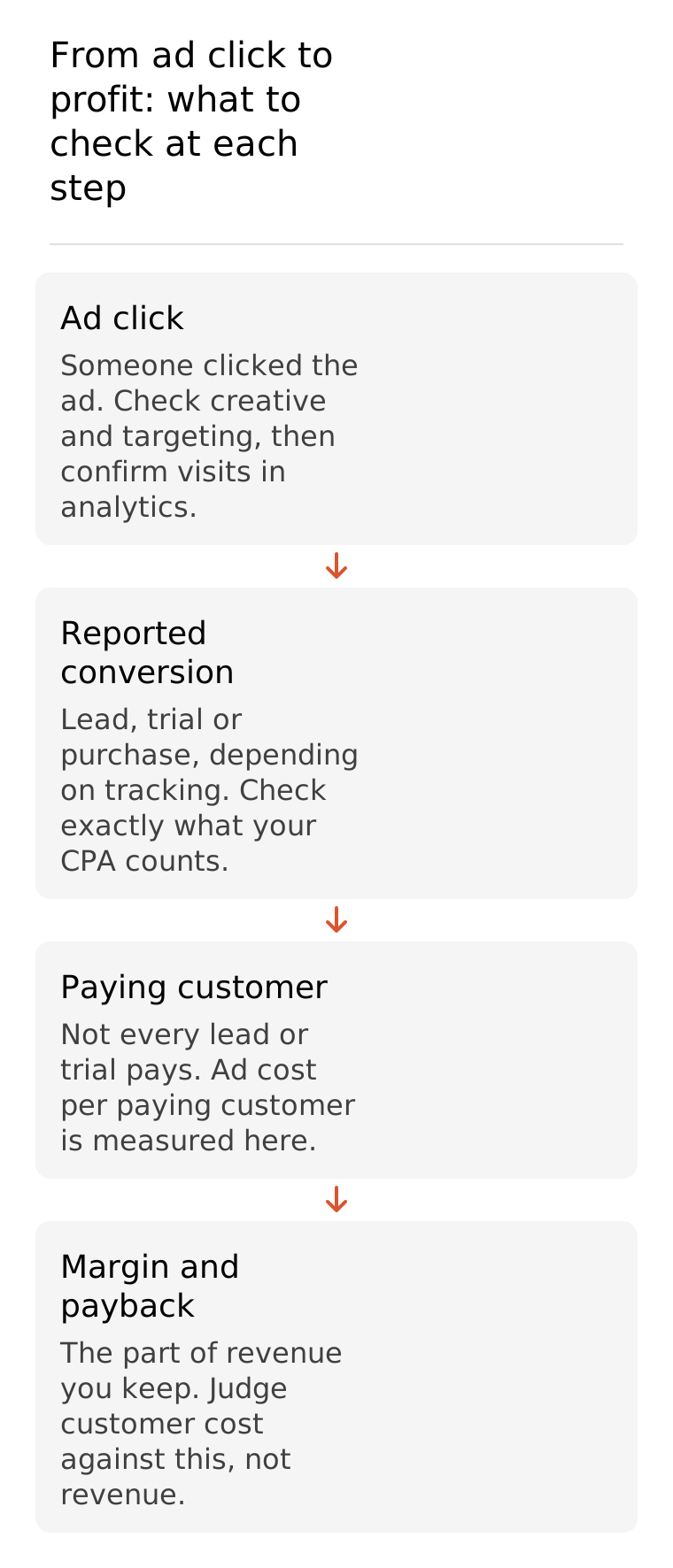
Cost per acquisition (CPA): How much does it cost you to get one lead, sign-up or purchase? Bear in mind that a lead or a free trial sign-up isn't a paying customer yet. Once you know what share of them go on to pay, you can work out your customer acquisition cost (CAC), which is the cost of each paying customer. Judge that against the margin a customer brings in, not the revenue they spend with you, because the margin is the part you actually keep. If your CAC sits comfortably below that margin, great. If not, something needs to change.
ROAS (Return on Ad Spend): For e-commerce especially, ROAS tells you how much revenue you're generating for every pound spent on ads. A ROAS of 3x means every £1 spent returns £3 in revenue. That's revenue, not profit, so check it against your margins before you celebrate.
Cost per lead: For B2B or service businesses, this is often more relevant than ROAS. Are the leads you're getting actually affordable given your average deal size? The figures shown by your ad platform measure the return on advertising spend. A fully loaded customer acquisition cost also includes the relevant sales and marketing costs, such as salaries, software and content. Keep those costs in view when you decide whether acquiring a customer is affordable.
Revenue attributed to ads: Not just what the platform claims, but what you can actually trace back to ad activity through your CRM or analytics.
The key with all of these is to read them honestly, not optimistically. Platforms like Meta and Google are very good at claiming credit for sales that would have happened anyway, so always cross-reference with your actual revenue data.
Are You Tracking Things Properly in the First Place?
Before any of the above metrics mean anything, you need to know your tracking is actually working. This is one of the most overlooked problems in paid advertising, and it causes enormous confusion. If your conversion tracking is broken or misconfigured, you're essentially flying blind, and you might be making decisions based on data that's completely wrong.
For Google Ads, you need the Google Tag (or Google Tag Manager) installed on your site, with conversion actions set up correctly for the things you actually care about: purchases, form submissions, phone calls, sign-ups. For Meta, you need the Meta Pixel firing on the right pages, with the right events. LinkedIn has its own Insight Tag. Each platform tracks differently, and they all need individual attention.
A quick way to sanity-check your tracking: compare the number of conversions reported in your ad platform against what you can see in your CRM or website analytics. If the numbers are wildly different, something is off. It's also worth using browser extensions like Meta Pixel Helper or Tag Assistant for Google to verify that tags are firing where they should be. Broken tracking doesn't just give you bad data. It also stops automated bidding from working properly, which can actively hurt your campaign performance.
What "Working" Looks Like at Different Stages
This is probably the bit most people skip over, and it leads to a lot of bad decisions. Paid ads are not a tap you turn on and immediately see results from. There's a learning phase, and if you don't account for it, you'll pull the plug too early on something that just needed more time.
How long that phase lasts isn't a fixed number of months. Google says the learning period for its automated bid strategies depends mainly on how many conversions your campaigns get, how long your conversion cycle is (the time it takes a click to turn into a conversion) and which bid strategy you use. It typically takes one to two conversion cycles, and sometimes less if there's plenty of conversion data. A shop where people buy on the day gets through that much faster than a SaaS product where a demo takes weeks to become a sale. Your CPA may well be higher while the bidding calibrates, and that's normal. The mistake is panicking and making constant changes. In Google Ads, changing a bid strategy's settings or adding and removing campaigns, ad groups or keywords can put it back into a "Learning" status, so you never collect a clean run of data.
Once a campaign has run through a couple of full conversion cycles without big changes, you should start seeing patterns emerge. CPAs should be settling down, and you should have enough conversion data to decide what to scale and what to cut. Google also notes that its algorithms keep learning after the "Learning" label disappears, so the label going away isn't a verdict either way. If you're still seeing nothing after several conversion cycles of reasonable budget and a properly set-up campaign, that's a different conversation.
Signs Your Ads Are Definitely Not Working
Sometimes it's not ambiguous at all. These are the red flags that mean your campaigns need investigating, not just more patience:
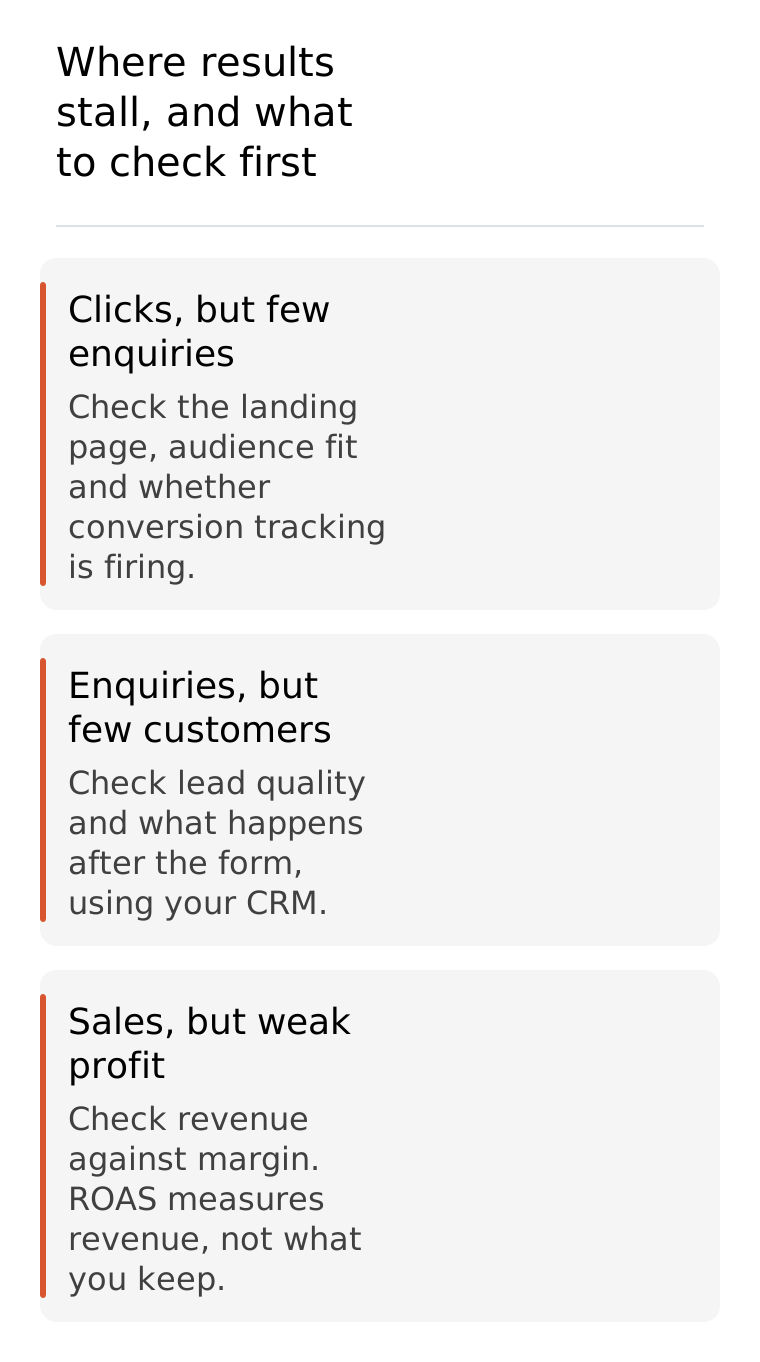
CPA is consistently climbing month on month with no change in targeting or creative. That's not variance, that's a trend.
Zero conversions after several of your normal conversion cycles at a sensible budget. If people usually buy or book within a week of clicking and you've had nothing for two months, that isn't the learning phase talking.
Traffic in your ad platform is wildly out of line with your website analytics. Some gap is normal, because Google Ads counts clicks and Google Analytics counts sessions. Two clicks within 30 minutes can be one session, Google Ads filters out invalid clicks, and someone can click and leave before the analytics tag loads. A big, persistent gap is still worth investigating, though. It can also mean auto-tagging is off, a landing page redirects, or the tag is missing from the page your ad sends people to.
You're getting clicks but no one stays on the site. A very high bounce rate on paid traffic often means you're reaching the wrong audience, or your landing page isn't doing what it needs to. In Google Analytics 4, bounce rate is the share of sessions that aren't engaged. By default, an engaged session lasts more than 10 seconds, includes a key event, or has at least two page or screen views. If engagement is poor across every channel, not just paid, check your measurement code before you blame the ads.
Your ad account spend keeps increasing but revenue stays flat. If the relationship between spend and results has completely decoupled, there's usually a structural problem somewhere.
Any one of these on its own might have an explanation. All of them together? That's a serious problem.
When to Be Patient and When to Make Changes
This is genuinely one of the trickiest parts of managing paid ads, and even experienced teams get it wrong sometimes. Normal variance in performance can look alarming if you're checking your dashboard every day. CPAs fluctuate. Weeks can be slow for seasonal reasons. Algorithms go through periods of instability. Not every dip is a disaster.
The general rule is: give a campaign enough time and data before making changes. There's no universal conversion count that makes a result trustworthy, but the fewer conversions you get, the longer you need to wait before a number means anything. If you're only getting two or three conversions a week, one bad week can look like the whole strategy is falling apart when really it's just noise.
If a campaign has run through several of your normal conversion cycles, with working tracking and enough budget to reach suitable prospects, but still produces no meaningful results, investigate it. Look at complete conversion cycles and comparable periods, allowing recent clicks time to convert. A single slow week is not enough to judge a campaign.
If You Genuinely Can't Tell, That's Probably an Answer
Here's the honest truth: if you've been running paid ads for a few months and you still can't confidently say whether they're working or not, that's already telling you something. It usually means either the tracking isn't set up properly, you don't have the right benchmarks to measure against, or you don't have someone in your corner who can interpret what the data is actually saying.
A well-managed paid ads strategy should give you clarity, not confusion. You should know your CPA, understand whether it's profitable, and have a clear view of where the campaign is heading. If that's not what you're getting right now, it might be worth speaking to someone who can get your tracking sorted, your benchmarks set, and your campaigns actually pulling their weight.
If you'd like a fresh pair of eyes on your ad account, we're happy to take a look. Get in touch with Snowball Creations and let's work out what's going on.